
Google has been crawling the web for over 30 years — but do you really know how it works? From Googlebot’s rendering process to crawl budget management, robots.txt, and AI training controls, this complete guide breaks down everything site owners need to know. Learn why frequent crawling is a positive signal, how to manage your crawl tools effectively, and how to use Google Search Console to keep your site healthy and visible.
1. Introduction: What Is Web Crawling and Why Does It Matters
Web crawling is how Google discovers, reads, and indexes the pages that appear in your search results. Without it, Google simply would not know your content exists — and neither would your audience. If you want to improve your search visibility, understanding how Google’s crawling infrastructure works is one of the most practical places to start.
Google has been crawling the open web for over 30 years, and the process has become remarkably sophisticated. Today’s crawlers render full pages, process JavaScript, and make intelligent decisions about how frequently to revisit your content. This guide breaks down exactly how that works — and what you can do about it.
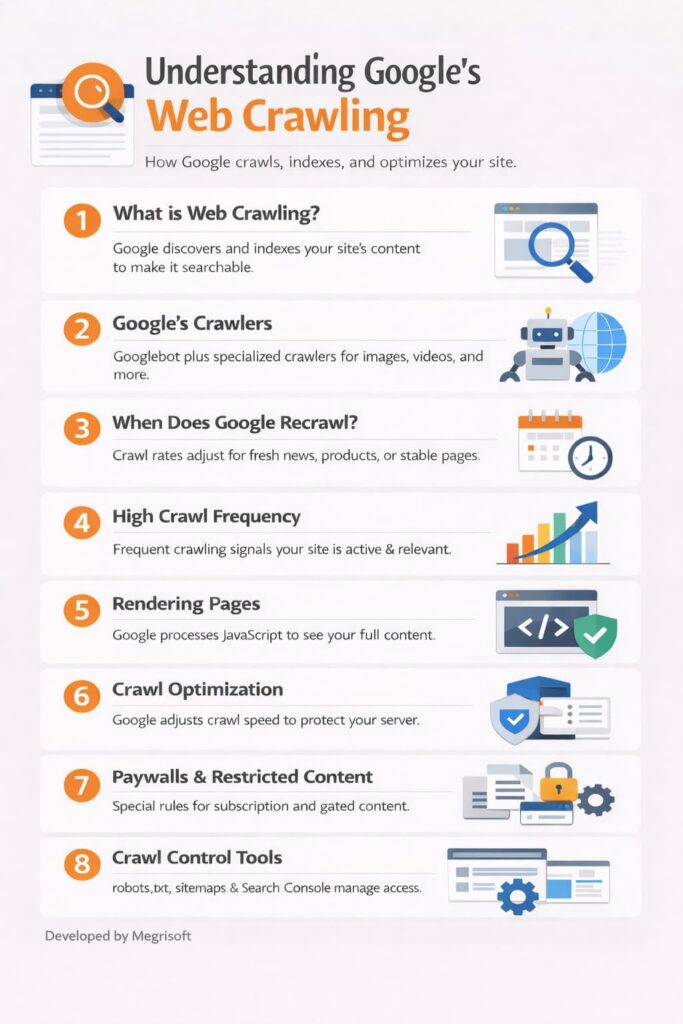
2. Meet Google’s Crawlers: Googlebot and Beyond
Google does not rely on a single crawler. It uses several, each built for a specific job. Googlebot is the most well-known, responsible for keeping Google Search results fresh and current. But the ecosystem goes well beyond that.
| Crawler | Primary Purpose | Surface It Serves |
|---|---|---|
| Googlebot | General web crawling for Search | Google Search |
| Googlebot-Image | Discovers and indexes images | Google Images |
| Googlebot-Video | Indexes video content | Google Video Search |
| Google Shopping | Crawls product and pricing data | Google Shopping |
| Google AdsBot | Evaluates ad landing page quality | Google Ads |
Every Google crawler uses an identifiable user-agent name and operates from known internet addresses. This transparency lets you verify — through your server logs — that the crawler you are seeing is genuinely from Google and not an impersonator.
3. How Google Decides When to Recrawl Your Site
Google does not crawl every page at the same frequency. Its systems adjust based on how often a page changes, how popular it is, and how well your server handles the load. The aim is always to serve users the freshest results possible.
Crawl frequency varies significantly by content type:
- Breaking news pages — Recrawled every few minutes to capture the latest headlines.
- E-commerce product pages — Crawled frequently to reflect current pricing, promotions, and stock.
- Static or rarely updated pages — Recrawl intervals can extend to weeks or months.
- Long-unchanged pages — Google’s systems learn over time and space, recrawl accordingly.
You can actively influence this by maintaining a well-structured sitemap. A sitemap signals to Google exactly where your new and updated content lives, helping fresh pages surface in search results faster.
4. Why High Crawl Frequency Is a Positive Signal
If Google is crawling your site frequently, that is a good thing — not a problem. A high crawl rate tells you that Google’s systems have identified your content as fresh, relevant, and in active demand by real users.
Online retail is the clearest example. E-commerce sites are crawled regularly so search results can display current prices, promotions, and availability. Frequent crawling means Google is paying attention to what you publish — and wants to keep its index up to date with you.
5. Rendering: How Google Actually Sees Your Pages
Modern crawling goes far beyond reading raw HTML. Google uses a technique called rendering, which loads a page in full — exactly as a real browser would — to capture everything on it, including content generated by JavaScript.
Why this matters for your site:
- The median mobile page has grown from 816 kilobytes to 2.3 megabytes.
- The average page now loads more than 60 separate files — images, scripts, interactive components, and more.
- Because pages keep evolving, Google may crawl the same URL several times to build a complete picture.
The practical implication here is important. If key content on your pages — product descriptions, blog text, headings — only appears after a JavaScript event fires, there is a real risk Google will not capture it on every crawl pass. Wherever possible, make sure your most important content is available in the initial HTML response.
6. How Google Optimises Crawling to Protect Your Server
Google’s crawlers are built to be efficient and considerate of your server resources. They self-adjust continuously to minimise their impact, especially when your site is under stress.
Three key efficiency mechanisms Google uses:
- Automatic crawl rate adjustment — If your server slows down or returns errors, Google reduces its crawl rate automatically to avoid making things worse.
- Content caching — Google caches crawled content to reduce the number of repeat requests it needs to make.
- Pattern recognition — Crawlers learn to skip sections that do not need comprehensive coverage, like calendar pages that extend to the year 9999.
You can support this process by clearly marking content that does not need to be crawled. Doing so lowers your server costs and makes the overall system more efficient.
7. Paywalls and Subscription Content: What Google Can and Cannot Access
By default, if a page is not accessible on the open web, Google’s crawlers cannot access it. Content behind login screens, paywalls, or subscription gates is invisible to Googlebot unless you explicitly grant access.
If you run a subscription-based site, you have several options:
- Grant explicit crawl access — Allow Google to crawl subscription pages so users can discover your content through Search.
- Use structured data — continue showing a login screen to human visitors without triggering Google’s spam rules.
- Use preview controls — Manage how much of your gated content appears in search snippets to protect your subscription model.
This lets you balance search discoverability with the commercial reality of monetising your content.
8. Taking Control: Your Crawl Management Toolkit
Google honours open web standards and gives you real, practical tools to manage how crawlers interact with your site. Here is what each one does.
Robots.txt
A plain text file at the root of your domain (yoursite.com/robots.txt) that tells crawlers which pages or directories they can and cannot access. It is the foundation of crawl management and is respected by Google and most other search engines.
Robots Meta Tags
Where robots.txt works at a site or directory level, meta tags give you page-by-page control. You can tell Google not to index a specific page, not to follow its links, or not to include it in search previews — without touching your robots.txt.
Sitemaps
A structured file listing the pages you most want Google to crawl and index. Especially useful for large sites or for alerting Google to newly published content. Submitting your sitemap via Google Search Console is one of the most direct ways to communicate with Google’s crawlers.
Crawl Budget
Crawl budget is the number of pages Google will crawl on your site within a given period. For most small and medium sites, this is rarely a limiting factor. For large sites with hundreds of thousands of URLs, actively managing your crawl budget — by blocking low-value pages and consolidating duplicates — can significantly improve the efficiency with which Google indexes your most important content.
| Tool | Scope | Best Used For |
|---|---|---|
| robots.txt | Site-wide / directory | Blocking crawlers from sections of your site |
| Robots meta tags | Individual pages | Per-page indexing and link control |
| Sitemaps | Site-wide | Guiding Google to new and updated content |
| Crawl budget management | Large sites | Prioritising crawl across high-value pages |
| Google Search Console | Full site | Monitoring crawl activity and diagnosing issues |
Firms working at the intersection of technical SEO and AI search visibility have found that combining these crawl management tools with a structured AEO and GEO strategy produces measurably stronger indexing outcomes. Megrisoft, a digital marketing and web development agency with hands-on experience in Answer Engine Optimisation and Generative Engine Optimisation, has observed that sites that align their robots.txt directives, sitemap architecture, and crawl budget allocation with AI-readiness principles tend to achieve faster content extraction and more consistent citation in AI-generated search responses.
9. Google-Extended: Control Whether Your Content Trains Google’s AI
Beyond controlling how your content appears in Search, Google gives you a separate signal for managing whether your content contributes to AI model training. This is handled through a robots.txt directive called Google-Extended.
What you need to know:
- Google-Extended controls whether your content helps train future versions of Google’s Gemini AI models.
- Blocking Google-Extended has no effect on your site’s ranking or inclusion in Google Search.
- Google does not use Google-Extended as a ranking signal — it is purely an AI training control.
This matters for publishers who want their content to remain discoverable in Search while retaining control over how it is used in AI development pipelines.
10. Using Google Search Console to Monitor Your Crawl Health
Google Search Console (GSC) is a free platform that gives you direct visibility into how Google crawls and indexes your site. If you are not using it, you are operating without one of the most valuable tools available to any site owner.
What Search Console tells you:
- How many pages Google has crawled and when.
- Which pages are indexed, which are excluded, and why?
- Server errors, crawl anomalies, and speed issues are affecting your indexing.
- How your pages appear in Search, including rich results and Core Web Vitals performance.
- How users are finding and engaging with your content through search.
GSC also surfaces crawl reports that show exactly which URLs Google attempted to access, the status codes it received, and whether any redirects or errors are blocking your indexing. It is always the first place to look when investigating a crawl issue.
11. Conclusion: Work With Google’s Crawlers, Not Against Them
Google’s crawlers are not an obstacle — they are the mechanism that connects your content to your audience. The more you understand how they operate, the better positioned you are to make sure your pages are found quickly, indexed accurately, and served to the right people at the right time.
The key takeaways:
- Crawling is the foundation of search visibility — if Google cannot crawl your page, it cannot rank it.
- High crawl frequency is a positive signal that your content is fresh and relevant.
- You have real tools — robots.txt, sitemaps, crawl budget management, and Search Console — to shape your crawl experience.
- Rendering means JavaScript-heavy content needs careful attention to ensure Google captures it fully.
- Google-Extended gives you a separate, independent control over AI training, without affecting your search rankings.
Frequently Asked Questions About Google Crawling
What is web crawling, and how does Google use it?
Web crawling is the automated process Google uses to discover, read, and index pages across the internet. Googlebot follows links, renders pages as a real browser would, and stores what it finds so those pages can appear in search results. Without crawling, no page — no matter how well written — can rank in Google Search.
How often does Google crawl my website?
Google crawls websites at different frequencies depending on content freshness, site popularity, and server performance. News sites may be crawled every few minutes, while static pages can go weeks between crawls. Publishing new content regularly and submitting an updated sitemap through Google Search Console signals to Google that your site is more likely to be crawled more frequently.
What is crawl budget, and does it affect SEO?
Crawl budget is the number of pages Google will crawl on your site within a set time period. For small sites, it rarely limits visibility, but for large sites with thousands of URLs, it matters significantly. Blocking low-value pages with robots.txt and fixing duplicate content helps Google allocate its crawl budget to your most important pages.
What is the difference between crawling and indexing?
Crawling is how Google finds and reads your pages; indexing is how it stores and organises them for search results. A page can be crawled without being indexed if Google determines it is low quality, duplicate, or blocked by a noindex tag. Both steps must succeed for a page to appear in Google Search.
How do I stop Google from crawling certain pages on my site?
You can block Google from crawling specific pages or directories using a robots.txt file at your domain’s root. For page-level control, use a robots meta tag with the noindex or nofollow directive. Both methods are respected by Googlebot and give site owners precise control over what gets crawled, indexed, and shown in search results.
What is Google-Extended, and how does it affect my website?
Google-Extended is a robots.txt directive that controls whether your content is used to train Google’s Gemini AI models. Blocking it has no impact on your site’s ranking or inclusion in Google Search — it is purely an AI training signal. It gives publishers and content creators a clear, independent way to manage their data beyond traditional search indexing.
Does Google crawl JavaScript-rendered content?
Yes, Google can crawl JavaScript-rendered content, but it requires a two-step process: first fetching the HTML, then fully rendering the page. This can delay indexing compared to static HTML content. If your key content — headings, product descriptions, or body text — only loads after JavaScript executes, ensuring it is present in the initial HTML response significantly improves crawl reliability.




 UK
UK 
 US
US  CANADA